How to fetch data from a API in Vue.js (axios)
In this tutorial, we are going to learn about how to fetch data in vue apps by using axios http library.
What is Axios ?
Axios is an http library which is used to make http requests in javascript applications.
Fetching data using Axios
Let’s fetch the data by using axios in our vue app, for learning purposes we are using the below API endpoint.
https://jsonplaceholder.typicode.com/posts/1This tutorial assumes that you already created a new vue project by using Vue-cli.
First, we need to install the axios library by running the following command in your terminal.
npm i axiosThis is a simple example that fetches the data from “json place holder API”.
<template>
  <div>
  <ul>
      <li v-for="(value, key) in post" :key="key">         {{ key }} : {{ value }}
     </li>
    </ul>
  </div>
</template>

<script>
import axios from "axios";

export default {
  data() {
    return {
      post: null,
    };
  },
  created: function() {
    axios
      .get("https://jsonplaceholder.typicode.com/posts/1")      .then(res => {
        this.post = res.data;
      })
  }
};
</script>
In the above code, we imported axios from axios library then we used axios.get method to fetch the data from the api.Once the data is available, we added it to this.post property.
created: This is a lifecycle hook called by the vuejs once the Vue instance is created.
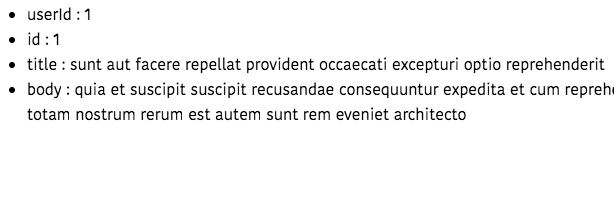
Inside our template, we used v-for directive to loop over the this.post object.
output:
Loading Indicator
Sometimes it takes long time to get the data from the backend in such cases we need to show some loading… Indicator to the user.
To add the loading… Indicator to our example we need to define a new data property called loading.
<template>
  <div id="app">
    <p v-if="loading">Loading...</p>    <ul v-else>
      <li v-for="(value, key) in post" :key="key">
         {{ key }} : {{ value }}
      </li>
    </ul>
  </div>
</template>

<script>
import axios from "axios";

export default {
  data() {
    return {
      loading: false,      post: null,
    };
  },
  created: function() {
    this.loading = true;    axios
      .get("https://jsonplaceholder.typicode.com/posts/1")
      .then(res => {
        this.loading = false;        this.post = res.data;
      })
  }
};
</script>
Error Handling
We need to handle the errors if our request fails due to failed network or something else.
To handle errors in the axios we need to use the catch method.
<template>
  <div id="app">
    <p v-if="loading">Loading...</p>
    <ul v-else>
      <li v-for="(value, key) in post" :key="key">
        {{ key }} : {{ value }}
      </li>
    </ul>
    <p v-if="error">{{ error }}</p>  </div>
</template>

<script>
import axios from "axios";

export default {
  data() {
    return {
      loading: false,
      post: null,
      error: ""    };
  },
  created: function() {
    this.loading = true;
    axios
      .get("https://jsonplaceholder.typicode.com/posts/1")
      .then(res => {
        this.loading = false;
        this.post = res.data;
      })
      .catch(err => {        this.loading = false;        this.error = err;      });  }
};
</script>- Share:


