React PropTypes tutorial for the beginners
In this tutorial, we are going to learn about and how to use proptypes in react with the help of examples.
PropTypes
- PropTypes helps us to check, whether component props is receiving correct type data or not.
To use PropTypes in react, first, we need to install the prop-types package from the npm.
npm i -D prop-typesExample:
import React from "react";
import ReactDOM from "react-dom";
import PropTypes from "prop-types";
function App(props) {
  return (
    <div className="App">
      <h1>{props.name}</h1>    </div>
  );
}

App.propTypes = {  name: PropTypes.string};
ReactDOM.render(<App name={1} />,document.getElementById("root"));
In this example, we have used PropTypes.string validator to name prop and we passed the value number inside render method, so we can see an error in the console.
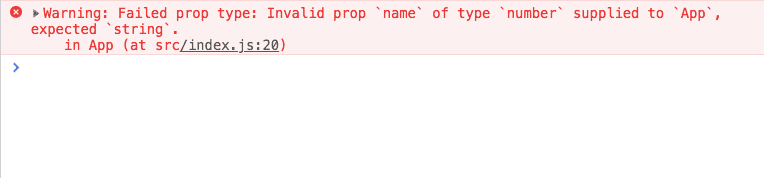
Have you seen, the error is clearly showing expected type is string and received is number.
Available Type validators
This are available type validators PropTypes package gives us.
  optionalArray: PropTypes.array,
  optionalBool: PropTypes.bool,
  optionalFunc: PropTypes.func,
  optionalNumber: PropTypes.number,
  optionalObject: PropTypes.object,
  optionalString: PropTypes.string
  optionalSymbol: PropTypes.symbol,
Required values
If we attach IsRequired property to any PropTypes we can get an error if we fail to pass the props to that component.
Example:
import React from "react";
import ReactDOM from "react-dom";
import PropTypes from "prop-types";

function App(props) {
  return (
    <div className="App">
      <h1>{props.name}</h1>
    </div>
  );
}

App.propTypes = {
  name: PropTypes.string.isRequired};

ReactDOM.render(<App />,document.getElementById("root"));
In this example, we fail to pass the prop name to <App/> component so that we can see an error in the console.
Default prop values
By using defaultProps property, we can define the default prop values of a
component.
Example:
import React from "react";
import ReactDOM from "react-dom";
import PropTypes from "prop-types";

function App(props) {
  return (
    <div className="App">
      <h1>{props.name}</h1>
    </div>
  );
}

App.defaultProps = {
  name: "UnKnown"};

ReactDOM.render(<App />,document.getElementById("root"));
Now, if we fail to pass a prop value it will default to Unknown.
Validating Objects
Example:
import React from "react";
import ReactDOM from "react-dom";
import PropTypes from "prop-types";

function App(props) {
  return (
    <div className="App">
      <h1>{props.user.name}</h1>      <p>{props.user.age}</p>    </div>
  );
}

App.propTypes = {
  user: PropTypes.shape({    name: PropTypes.string,    age: PropTypes.number  })};

const user = { name: "Sai", age: 3 };ReactDOM.render(<App user={user} />, document.getElementById("root"));
In this example, we are specifying the shape of a user prop object.
Validating array of objects
Example:
App.propTypes = {
  usersArray: PropTypes.arrayOf(   PropTypes.shape({
    name: PropTypes.string,
    age: PropTypes.number
  })).isRequired
};
Requiring props.children
With PropTypes.element property, we can specify that component can only receive a single child.
import React from "react";
import PropTypes from "prop-types";

class App extends React.Component {
  render() {
    return (
      <div>
         {this.props.children}      </div>
    );
  }
}

App.propTypes = {
children: PropTypes.element.isRequired};- Share:


